Logotype
For developers
By Qliro
Select search filters:
0
0
/
/
Loyalty sign-up
Pamper your consumers with loyalty driving value propositions within the checkout
Qliro Checkout supports seamless customer sign-up and identification directly for your loyalty provider. This means customers won’t need to enter their details multiple times.
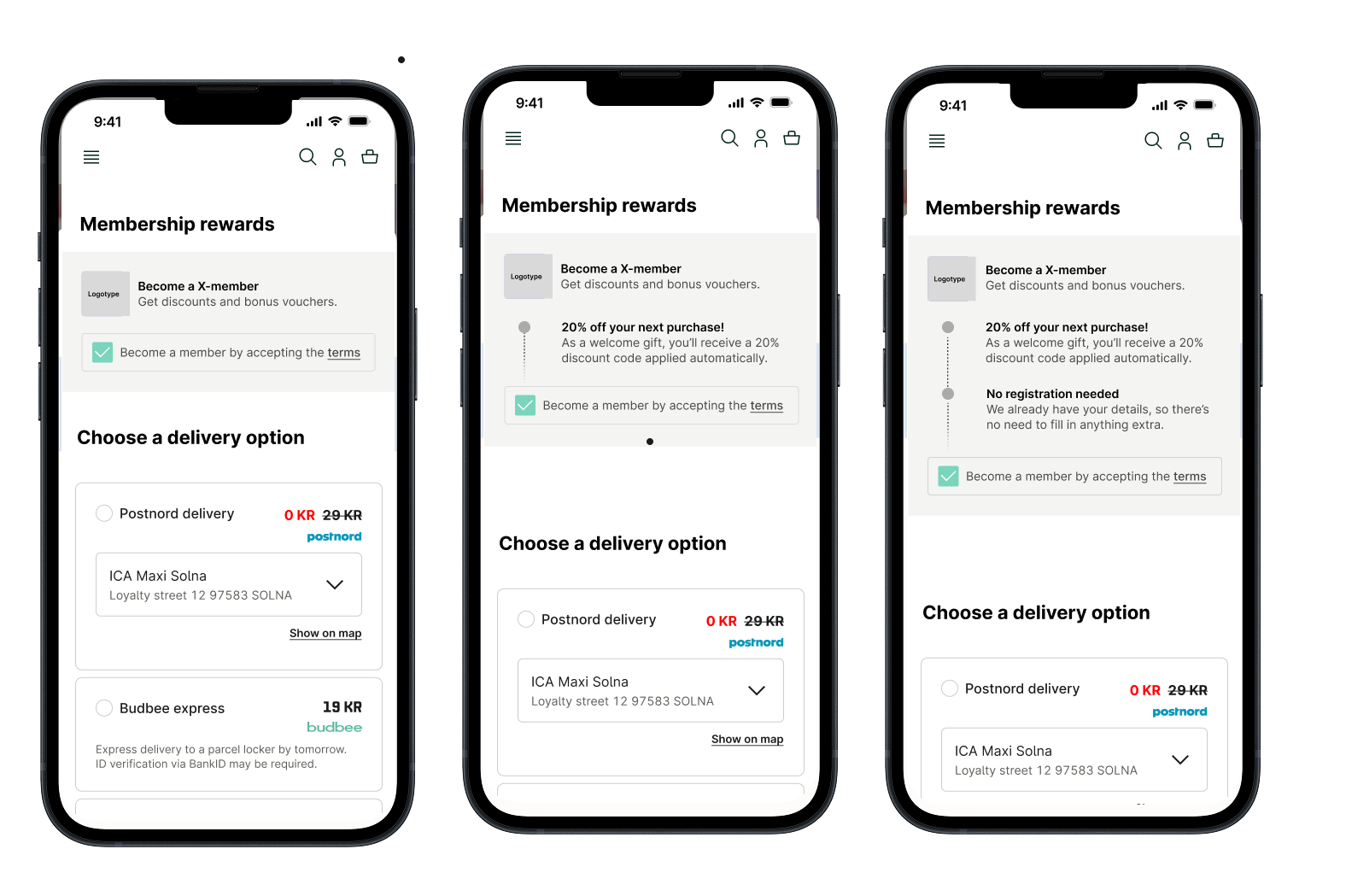
For users who aren’t already members, Qliro Checkout displays a customizable reward section during the purchase flow. If the customer opts in, they will be automatically signed up and identified using the information they provide at checkout.
Overview
Qliro handles what loyalty module the customer sees in the checkout: signup, update or nothing. Qliro also decides what actions to take towards your loyalty provider if the customer opted in to the loyalty programme. The exact behaviour varies depending on your loyalty provider, see Voyado and Klaviyo.
Pre-purchase
Include LoyaltyConfiguration in your create order call. Normally this is static data that will not change for different customers or orders.
Qliro will search for the customer in your loyalty provider. Non-members will be asked to signup at checkout. Existing members will proceed normally. See Voyado and Klaviyo for specific behaviour.
The following data will be included on the frontend listener OnCustomerInfoChanged:
1
2
3
4
5
6

loyalty: {
  id: "customerLoyaltyId",
  provider: "provider",
  isMember: true,
}
Post-purchase
Qliro will perform the desired actions towards your loyalty provider after the purchase is completed. The customer will be registered as a member if they opted in at checkout. See Voyado and Klaviyo for specific behaviour.
Qliro will send notifications of type LOYALTY_PROVIDER_MEMBER_CREATE or LOYALTY_PROVIDER_MEMBER_UPDATE on MerchantNotificationUrl when member creation or update succeeds or fails. See notifications for more info.
Getting started
Contact merchant solutions to activate the feature on your account. You will be asked to provide an SVG logo that will be used in the signup component in the checkout. See Voyado and Klaviyo for provider-specific requirements.
Once enabled, include LoyaltyConfiguration in create order call. For provider-specific customization see Klaviyo and Voyado.
Voyado integration
Qliro checkout can create new contacts or update existing ones in Voyado Engage. The data provided in LoyaltyConfiguration.Voyado will be used to determine what the customer will see in the checkout and what actions Qliro will take towards Voyado post purchase. Please see the API reference for descriptions of all properties.

You will be asked to provide an API-key and a URL to your Voyado Engage instance.
Signup of new contacts
If the customer is not found in Voyado, they will be treated as a non-member and asked to signup. If they opt in, Qliro will create a new contact in Voyado.
If the customer is found in Voyado but is missing any MemberConsents, they will be treated as a non-member. If they opt in, Qliro will update their consents post purchase.

If the customer is found in Voyado and has all of the MemberConsents the customer will be treated as a member and will not be asked to signup.
The following data is included when creating contacts in Voyado:
1
2
3
4
5
6
7
8
9
10
11
12
13
14
15
16
17
18
19
20
21
22
23
24
{
  email: "test@qliro.com",
  firstName: "First",
  lastName: "Last",
  city: "City",
  zipCode: "12345",
  street: "Street",
  socialSecurityNumber: "xxxxxxxxxx",
  country: "SE",
  mobilePhone: "+4612345678",
  consents: [{
    id: "consentId",
    value: true,
    date: "2025-01-01T00:00:00+0100",
    source: "Qliro",
    comment: "Accepted at checkout"
  }],
  contactType: "contactType",
  preferences: {
    acceptsEmail: true,
    acceptsSms: false,
    acceptsPostal: false
  }
}
  • Source is “Qliro”, comment is “Accepted at checkout” for each consent.
  • Preferences is acceptsEmail: true, others false.
  • Social security number is omitted if not available to Qliro.
Update of existing contacts
If the customer is found in Voyado, has all MemberConsents, and you included Update.CheckBoxes, the customer will be shown checkboxes for any consents they are missing. Customize the update text via UpdateText (on LoyaltyConfiguration) and the checkbox label via Update.CheckBoxes.
Klaviyo integration
Qliro checkout can create new profiles or update existing ones in Klaviyo. The following data will be used when creating new contacts:
1
2
3
4
5
6
7
8
9
10
11
12
13
14
15
16
17
18
{
  "attributes" : {
    "email" : "qlirotest@qlirotest.com",
    "phone_number" : "+46761234567",
    "first_name" : "Curious",
    "last_name" : "George",
    "location" : {
      "country" : "SE",
      "address1" : "Drottninggatan 56",
      "city" : "Stockholm",
      "zip" : "11121",
    },
    "properties" : {
      "gender" : "Male",
      "birthday" : "1970-01-01T00:00:00"
    }
  }
};
 
How-to
  1. Contact merchant solutions.
    You will be asked to provide a Klaviyo API-key that you create from the Klaviyo Portal with the correct permissions. As of today, the following permissions are required in order for the integration to work: Profile, List, Subscription (full access)
  2. Specify the following properties in the Klaviyo parameter under LoyaltyConfiguration
  3. Property
    Type
    Description
    Mandatory
    Lists
    List (string)
    Klaviyo list names (not id:s) that the profile will be added to on opt-in. Requires that merchant has already created these lists beforehand.
    No
    UseEmailSubscriptionChannel
    Boolean
    If the profile should subscribe to the email subscription channel on opt-in. Requires that merchant has configured the channel properly on Klaviyo.
    No
    UseSmsSubscriptionChannel
    Boolean
    If the profile should subscribe to the SMS subscription channel on opt-in. Requires that merchant has configured the channel properly on Klaviyo.
    No


Good to know
  • Qliro might not have access to the customer's social security number, meaning that some properties might not be set, such as gender and birthday.
  • If profiles are intended to subscribe to email or SMS marketing channels upon creation, they may remain unsubscribed if the merchant has enabled Klaviyo’s double opt-in setting. This requires customers to confirm their subscription through a confirmation email or SMS.